


BGG Collection Caching and More
Author: Brian
Published: October 20, 2025It is time for a few updates. Overall, your experience at Pub Meeple should be speedier as the site is doing more work to keep the loaders to a minimum. Here are some specific updates centered around your Board Game Geek collection.
BGG collection caching
When you request your Board Game Geek collection it will cache it locally on your device so when you come back it will be immediately available for you. If you make changes to your collection on BGG and need to update the cached version on Pub Meeple, just click the Update button. If you want to pull a different collection, click the Change button.

Associate your BGG username with you Pub Meeple account
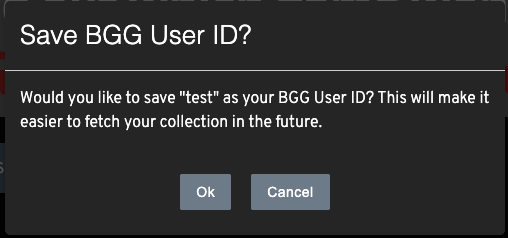
If you have an account at Pub Meeple you can add your BGG Username to it so that you don’t have to type it in each time you come back to rank your games. When you request your collection the site will ask if you want to save your BGG username. If you do, no matter what device you are on (unlike collection caching), if you are logged in to Pub Meeple it will automatically pull your collection for you.
This is separate from collection caching but together they make a useful combo.
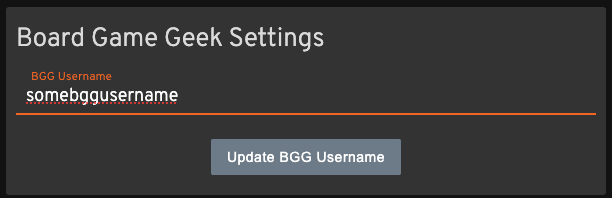
If you need to change or remove the BGG Username associated with your account, click on the account icon at the top right of the page. Then click the “Manage User” button. Type in the change you want to make and click the “Update BGG Username” button.
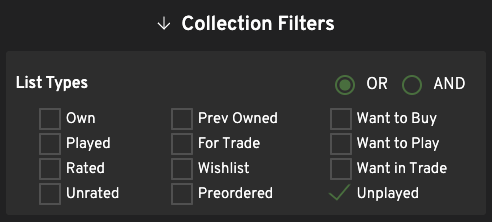
Unplayed collection filter
This is for all of you who have requested this feature. Sometimes you don’t want to rank the games you’ve played, you want to rank the ones you haven’t - either to decide which to play next or which to cull. You can now filter your collection for unplayed games.
As always, if you have comments or questions, please contact me!
Posted in:
About the Author:

Brian
There are few things in life that I enjoy more than gathering around a table with people to make new shared memories through the interactions board games create. I have been playing board games my whole life, but I have been focused on them as a hobby for the past 20+ years. Board games offer a unique medium for social interaction and fun. I really look forward to playing these games with my kids as a way to interact and stay connected with them. In the last several years, I have been teaching myself web development - this site and the Ranking Engine are direct results of that effort. I also have a love for board game design but that has taken a back seat for this time of my life.
- Favorite Games: Eclipse, Gloomhaven, Shogun, Skymines, Star Wars Rebellion, Carcassonne
- Favorite Mechanisms: Worker Placement, Resource/Financial Markets, Deck Building
- Childhood Favorites: Clue: The Great Museum Caper, The Omega Virus, Mystery Mansion